
Appearance
What is NOMA Sync?
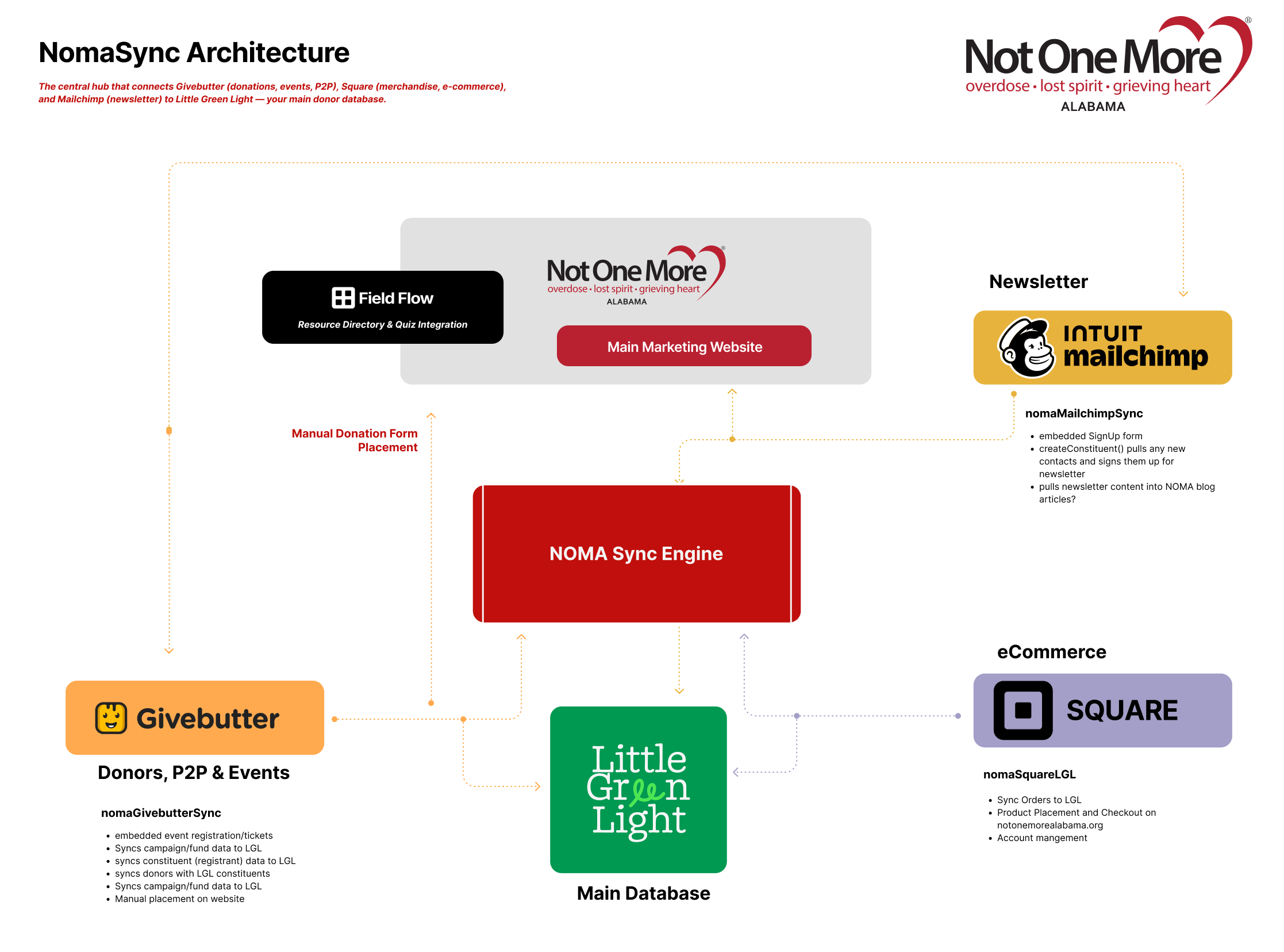
NOMA Sync Engine is the central hub that connects Givebutter (donations, events, P2P), Square (merchandise, e-commerce), and Mailchimp (newsletter) to Little Green Light — your main donor database.
One system. One database. Zero manual data entry.
Start here: Dashboard
Log in at the Dashboard to monitor syncs, fix errors, and configure how campaigns map to LGL.
Dashboard at a Glance
| Page | What you do |
|---|---|
| Syncs | See all sync activity, filter by source/status, open a row for details, resolve errors, resync |
| Mappings | Set how Givebutter and Square campaigns map to LGL funds |
| Square Orders | View orders, enrich customer data, resync to LGL |
| Mailchimp Settings | Map lists and tag rules for newsletter sync |
| Settings | LGL environment (production/sandbox), alert recipients, defaults |
| Teams | Manage users and permissions (Super Admin only) |
Dashboard vs Worker
- Dashboard (
https://noma.21adsmedia.io/) — Where you log in and work. This is the only URL you need. - Worker — The backend that receives data from Givebutter, Square, and Mailchimp. You never open it. Your developer configures webhooks and API keys using a separate webhook URL in each platform (not the Dashboard URL).
The Three Integrations
What Gets Synced
| Source | What | Where | When |
|---|---|---|---|
| Givebutter | Donations, event tickets, P2P fundraisers | LGL constituents + gifts | Real-time |
| Square | Online store orders | LGL constituents + gifts | Real-time |
| Mailchimp | Newsletter signups, unsubscribes | LGL constituents + tags | Real-time |
Events on the site: Event campaigns from Givebutter sync to the NOMA website; staff can also create recurring (weekly/monthly) events in WordPress. See Events.
Quick Start
Who Uses NOMA Sync?
- NOMA Staff (Viewers): Monitor donations, view sync logs, check campaign totals
- NOMA Admins: Configure mappings, resolve sync errors, manage settings
- Super Admin: Full access, invite users, manage integrations
How it works (high level)
When someone donates, buys, or subscribes:
- Event arrives → The system receives it from Givebutter, Square, or Mailchimp
- Data is processed → Campaign is mapped to an LGL fund; constituent is matched or created
- LGL is updated → Gift (or tag update) is recorded
- Dashboard updates → The sync appears in Syncs with status success or failed
Everything in Little Green Light within 5–10 seconds.
Glossary
| Term | Meaning |
|---|---|
| Dashboard | The web app where you log in to monitor syncs and configure mappings. |
| LGL | Little Green Light — NOMA’s main donor database. |
| Constituent | A donor or contact record in LGL (name, email, etc.). |
| Fund | A campaign or designation in LGL (e.g. “Unrestricted,” “Event 2025”). |
| Webhook | An automatic notification from Givebutter, Square, or Mailchimp when something happens (donation, order, unsubscribe). The system receives it and syncs to LGL. |
| Sync | One run of the system moving data (e.g. one donation = one row in Syncs). |