

Appearance
The Big Picture
NOMA Sync Engine is the central integration layer that keeps Little Green Light (your main donor database) in sync with all external platforms.
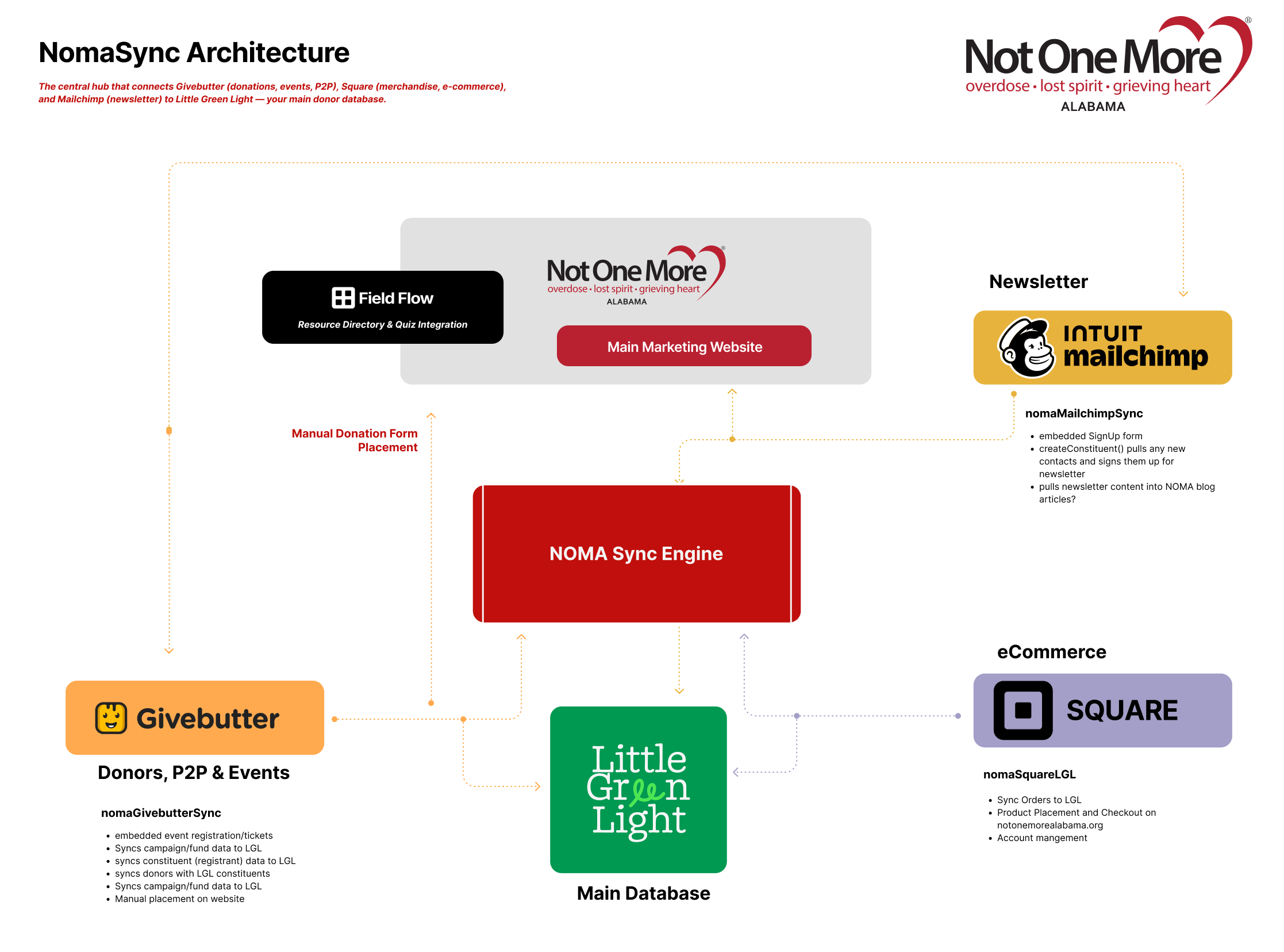
System Components
1. NOMA Sync Engine
What it is: The backend that receives data from Givebutter, Square, and Mailchimp and writes to LGL. It runs in the cloud; your developer manages the technical setup (see Developer setup).
What it does:
- Receives webhooks from Givebutter, Square, Mailchimp
- Processes donations, orders, signups in real-time
- Maps campaigns/funds to LGL
- Creates/updates constituents and gifts in LGL
- Logs all sync activity
- Runs backup polling and summary emails
2. Little Green Light (Main Database)
What it is: NOMA's donor CRM and fundraising database.
What gets synced:
- Constituents - Donor profiles (name, email, phone, address)
- Gifts - Donations, purchases, event registrations
- Funds/Campaigns - Where money is designated
- Custom Fields - Shirt sizes, event choices, referral sources
- Tags - Mailchimp list membership, unsubscribe status
LGL Environments:
- Production - Live donor data
- Sandbox - Testing (switch in dashboard Settings)
3. Integration Sources
Givebutter (primary)
- Purpose: Donations, event registration, peer-to-peer fundraising
- What syncs: Donor/registrant → LGL constituent; donation/ticket → LGL gift; campaign → LGL fund; custom fields
Square
- Purpose: Online store orders (merchandise, products)
- What syncs: Customer → LGL constituent; order → LGL gift; location → LGL campaign (via overrides)
Mailchimp
- Purpose: Newsletter signups, unsubscribes, list management
- What syncs: New contact → LGL constituent + tag; unsubscribe → remove newsletter tag; list/tag changes → LGL
4. Dashboard (React App)
URL: https://noma.21adsmedia.io/
Purpose: Web interface for monitoring, configuring, and managing syncs.
Pages:
- Dashboard - Overview, stats, recent syncs
- Syncs - Full sync log with filters, detail view, resolve/resync
- Mappings - Configure Givebutter/Square → LGL campaign mappings
- Square Orders - View orders, enrich customer data
- Mailchimp Settings - List mapping, tag rules
- Settings - LGL environment, alerts, testing
- Teams - User management (admin only)
Auth: JWT-based login with magic links
Roles:
- Viewer - Read-only access
- Admin - Full access except user management
- Super Admin - Everything (Andrew only)
Data Flow Examples
Givebutter Donation
mermaid
sequenceDiagram
    participant Donor
    participant Givebutter
    participant Worker as NOMA Sync Engine
    participant LGL as Little Green Light

    Donor->>Givebutter: Makes $50 donation
    Givebutter->>Worker: POST /webhooks/givebutter
    Worker->>Worker: Verify signature
    Worker->>Worker: Map campaign to LGL fund
    Worker->>LGL: Search for constituent by email
    alt Constituent exists
        Worker->>LGL: Create gift ($50)
    else New constituent
        Worker->>LGL: Create constituent
        Worker->>LGL: Create gift ($50)
    end
    Worker->>Dashboard: Log sync event (success)
Square Order
mermaid
sequenceDiagram
    participant Customer
    participant Square
    participant Worker as NOMA Sync Engine
    participant LGL as Little Green Light

    Customer->>Square: Purchases t-shirt ($25)
    Square->>Worker: POST /webhooks/square (order.created)
    Worker->>Worker: Verify signature
    Worker->>Square: Fetch full customer details
    Worker->>Worker: Apply location override (map to campaign)
    Worker->>LGL: Create/update constituent
    Worker->>LGL: Create gift ($25, mapped campaign)
    Worker->>Dashboard: Log sync event (success)
Mailchimp Unsubscribe
mermaid
sequenceDiagram
    participant Subscriber
    participant Mailchimp
    participant Worker as NOMA Sync Engine
    participant LGL as Little Green Light

    Subscriber->>Mailchimp: Clicks unsubscribe
    Mailchimp->>Worker: POST /webhooks/mailchimp (unsubscribe)
    Worker->>Worker: Verify signature
    Worker->>LGL: Find constituent by email
    Worker->>LGL: Remove newsletter tag
    Worker->>Dashboard: Log sync event (success)
Error Handling & Retry
Webhook failures:
- Worker returns 500 → Source platform retries (3x with backoff)
- Logged in Syncs page with full error details
- Admin can manually resync from dashboard
LGL API failures:
- Retries up to 3 times with exponential backoff
- Logged as error in Syncs page
- Alert email sent to configured recipients
Idempotency:
- Duplicate webhooks detected and skipped
- Safe to retry any sync operation
Backup & Monitoring
Cron Jobs:
- Polling (every 15 minutes): Checks for missed Givebutter/Square events
- Weekly Summary (Sundays): Email with sync stats, error count, campaign totals
- Campaign Sync (hourly): Refreshes Givebutter campaign cache
Alerts:
- Email sent when sync fails
- Configurable recipients in Settings
Health Check:
GET /health- Returns system status- Dashboard "Test Connection" buttons verify LGL/Givebutter/Square connectivity
Performance
- End-to-end sync: 5–10 seconds (event → LGL)
- Backup: Polling every 15 minutes; weekly summary email
Roadmap
Planned:
- Manual Donation Form integration
- Quiz App & Resource sync
- Donorbox (optional upgrade)
- Mailchimp blog content sync
Current Focus:
- Givebutter, Square, Mailchimp are production-ready
- Dashboard feature complete
- LGL environment switching live